The Theme Builder lets you design the parts of your site that themes usually control, using blocks. The free version covers the Header and Footer. ShapeBlock Pro adds templates for Single Post, Single Page, Archive (the blog, category, tag, author, and date pages), Search Results, and the 404 Page.
How to Create a Template
- In your WordPress dashboard, go to ShapeBlock > Theme Builder.
- Click Add New, choose the template type, and give it a name.
- Build the template in the block editor. Use the Theme Builder blocks below to show the post title, content, and other dynamic parts.
- Publish the template.
- On the Theme Builder page, click the funnel button in the Display Conditions column and choose where the template is used.
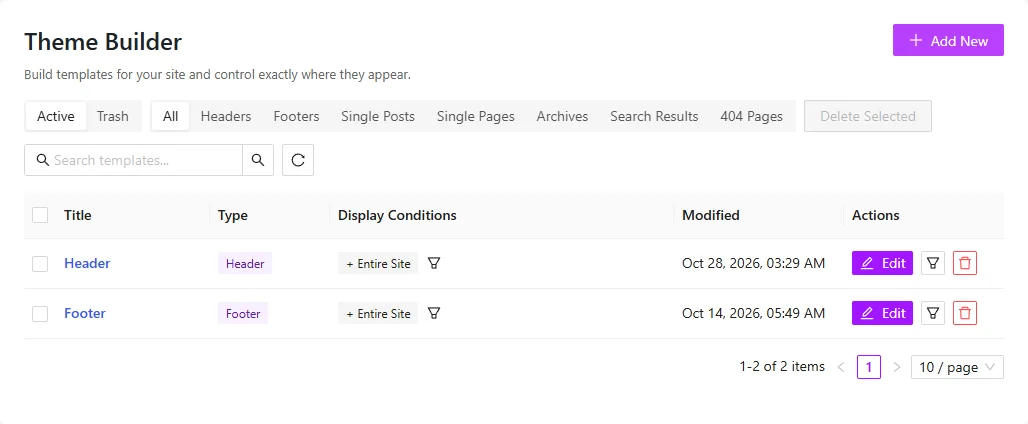
Use the tabs at the top of the list (All, Headers, Footers, Single Posts, Single Pages, Archives, Search Results, 404 Pages) to filter templates by type. Active and Trash switch between live and deleted templates.
Template Types
- Single Post: Used for blog posts.
- Single Page: Used for pages.
- Archive: Used for the blog page and category, tag, author, and date pages.
- Search Results: Used for the search results page.
- 404 Page: Used when a page is not found.
Display Conditions
Each template has its own conditions, for example Entire Site, All Posts, All Pages, or one page. Archive templates can also target the Blog Page (latest posts), Category Pages, Tag Pages, Author Pages, or Date Pages. A page with no matching template keeps your theme template.
Theme Builder Blocks
These blocks show the content of the post, page, or archive being viewed. Find them in the block inserter under ShapeBlock.
- Post Title: The title of the post or page.
- Featured Image: The featured image of the post or page.
- Post Content: The text and blocks of the post or page.
- Post Excerpt: A short summary of the post.
- Post Meta: Author, date, categories, and comment count.
- Post Categories / Tags: The categories or tags of the post.
- Author Box: The author with avatar and bio.
- Post Pagination: Links to the previous and next post.
- Post Comments: The comments and the comment form.
- Related Posts: More posts from the same category.
- Archive Title: The blog, category, tag, author, date, or search title.
- Archive Description: The category, tag, or author description.
- Archive Posts: The posts of the blog, archive, or search page, with page links.
Note: In the editor, these blocks show a preview. The real content appears on the site.