















Ask ChatGPT, Perplexity or Google’s AI Mode a question about your niche and you will usually get a short written answer with two or three sources named underneath. If your site is not one of them, ranking well in classic search does not help much in that moment. This guide shows how to make your WordPress site visible to AI search engines, step by step, based on what the platforms actually document rather than what tool vendors would like you to believe.
The short version: let the right bots in, make your text readable without JavaScript, write sections that can be quoted on their own, back them up with accurate schema, and get indexed in Bing as well as Google. Everything else is optional.
Why AI search engines change what “visible” means
Classic search gives people a ranked list and lets them choose. AI search reads several pages, writes one answer and credits a handful of sources. That is a different game, and the click-through numbers show why it matters. Ahrefs data, summarized by Themeisle, found that the position-one click-through rate drops by 58% when an AI Overview appears on the results page.
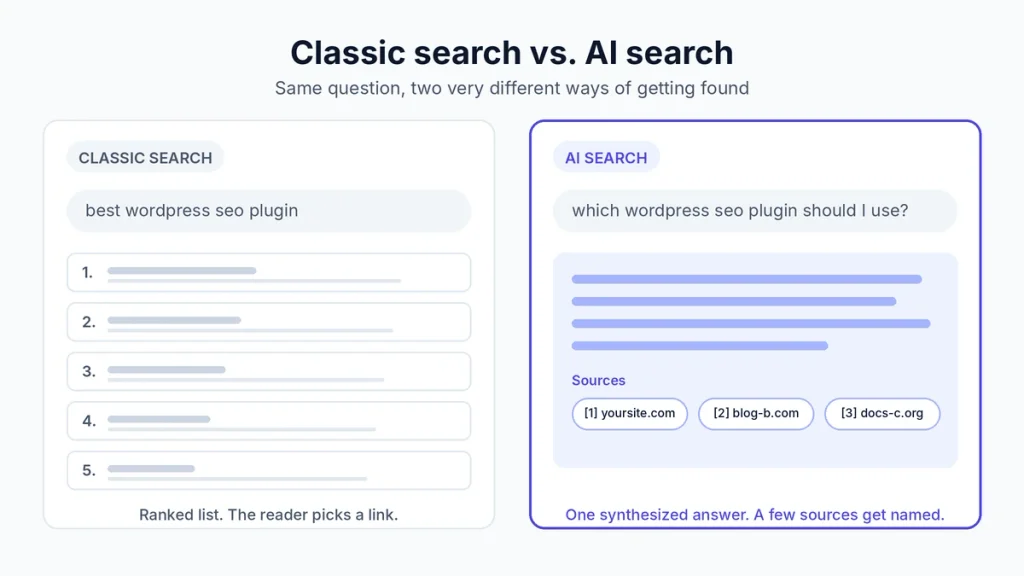
Nobody outside these companies can tell you exactly how AI search engines choose their sources, so be wary of anyone selling a guaranteed citation boost. What we can say is simple. A crawler has to be allowed to reach your page, it has to be able to read the text, and the page has to answer the question clearly enough to quote. Google’s own documentation on AI features and your website says AI Overviews and AI Mode need no special markup beyond being indexed and eligible to show a snippet.
That gives us a practical order of work. Access first, readability second, content structure third, and extras last.
Step 1: Let the right AI crawlers reach your site
Most WordPress sites that are invisible to AI search engines are invisible by accident. An old SEO setting, a security plugin or a CDN rule blocks bots nobody remembered to check. Start by opening yoursite.com/robots.txt in a browser and look for any Disallow line aimed at the crawlers below.
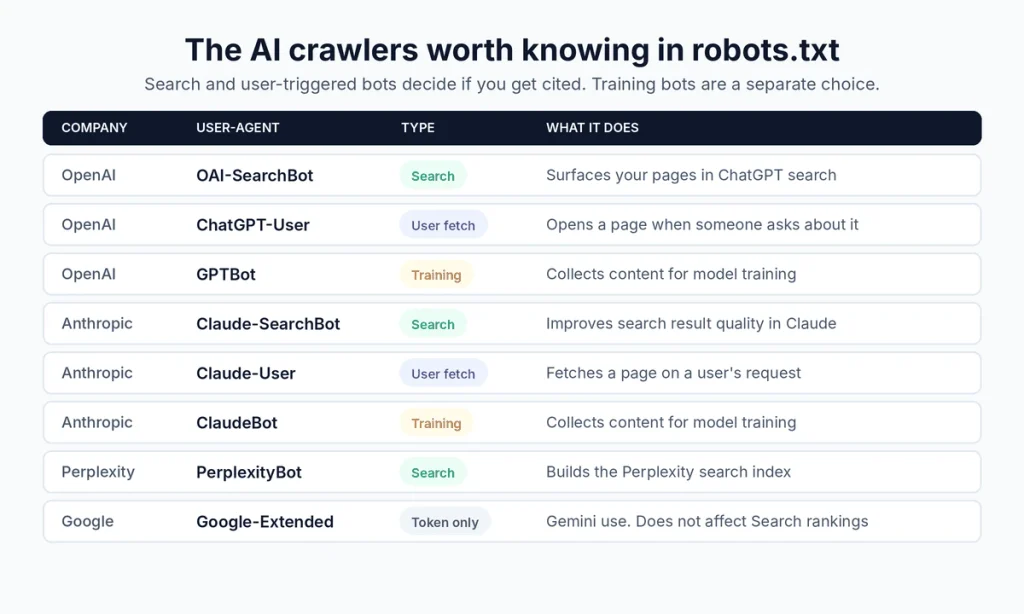
The important detail is that each company now runs separate bots for different jobs. OpenAI documents OAI-SearchBot for search results, ChatGPT-User for pages a person asks about, and GPTBot for training. Anthropic splits Claude-SearchBot, Claude-User and ClaudeBot the same way, and Perplexity uses PerplexityBot and Perplexity-User. You can read OpenAI’s definitions on its crawler documentation page.
That split means blocking training and allowing search is a legitimate setup. Blocking GPTBot does not by itself remove you from ChatGPT search results, because OAI-SearchBot is controlled separately. Two other names often get misunderstood. Google-Extended is only a control token for Gemini, and blocking it does not remove you from Google Search or AI Overviews. Applebot-Extended works the same way for Apple’s AI features.
If you use Rank Math, open Rank Math SEO → General Settings → Edit robots.txt. Any robots.txt editor works. A clean setup that welcomes search bots and opts out of training looks like this:
User-agent: OAI-SearchBot
Allow: /

User-agent: ChatGPT-User
Allow: /

User-agent: Claude-SearchBot
Allow: /

User-agent: Claude-User
Allow: /

User-agent: PerplexityBot
Allow: /

User-agent: GPTBot
Disallow: /

User-agent: ClaudeBot
Disallow: /
Treat the last two blocks as your call, not a recommendation. If you are happy for your content to be used in training, remove them. The Allow lines only matter if something earlier in the file is blocking the same bot, but spelling them out makes the intent obvious to the next person who edits the file.
Check what robots.txt cannot tell you
A permissive robots.txt does nothing if the request never reaches WordPress. Cloudflare, security plugins and web application firewalls can return a 403 to unfamiliar bots no matter what your file says. A quick test from a terminal catches the common user-agent rules:
curl -I -A "OAI-SearchBot" https://yoursite.com/You want a 200 back, not a 403. Also confirm that Settings → Reading → Discourage search engines from indexing this site is unticked. It sounds obvious, but it is a common leftover from staging.
Step 2: Make sure your text is readable without JavaScript
Many AI search engines and fetchers read the raw HTML and do not run your scripts the way a browser does. If a page builder or a plugin loads your main text after the page renders, the bot may see an empty shell. The test takes thirty seconds: open a post, press Ctrl+U (or Cmd+Option+U on a Mac) to view source, and search for a sentence from the middle of the article. If it is there, you are fine. If it is not, fix that before doing anything else on this list.
Speed matters here too. Crawlers have time limits, and a page that takes several seconds to respond gets read less reliably. Page caching, an optimized theme and fewer heavy plugins help both visitors and bots.
Step 3: Write answer-ready content
This is the part of AI visibility that you fully control, and it is also just good writing. AI search engines pull out short, self-contained passages, so each section of your post should work if someone quotes only that section.
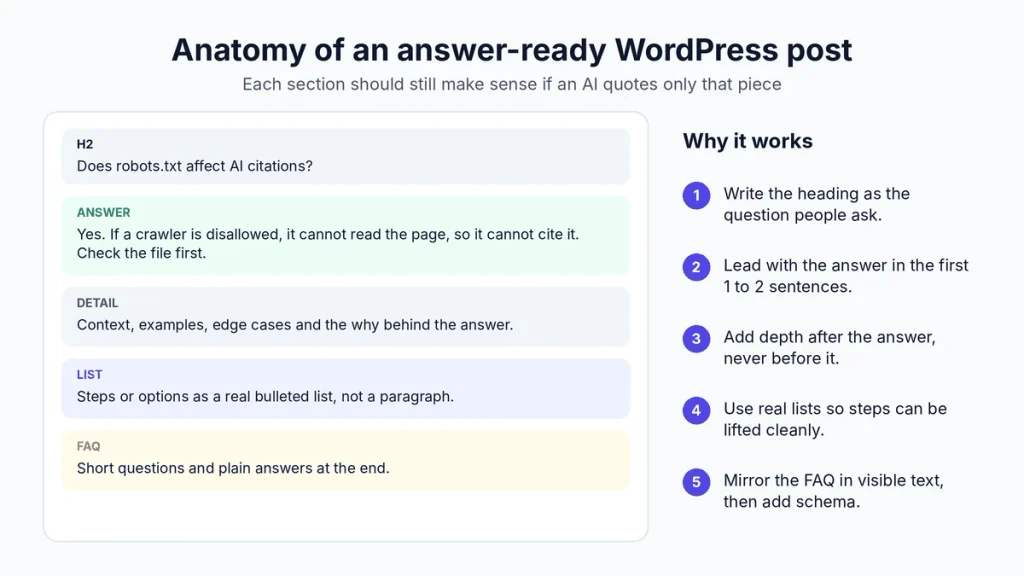
- Use question-style headings where it is natural. “Does robots.txt affect AI citations?” matches how people actually ask.
- Answer first. Put a direct one or two sentence answer right under the heading, then add detail, examples and exceptions.
- Use real lists and tables for steps and comparisons, because they are easier to lift cleanly than a long paragraph.
- Name things plainly. Write the product, person and place names in full instead of leaning on “it” and “this tool”.
- Show who wrote it. A real author name, a short bio and a date make it easier for readers and machines to judge trust.
- Add a short FAQ to your best posts, using questions your customers actually send you.
If you write in the block editor, all of this maps to headings, lists and a few well-chosen blocks. Our guide to building a WordPress website with Gutenberg covers the basics, and the ShapeBlock Gutenberg blocks plugin adds more layout options without bloating the page.
Step 4: Add schema that matches what is on the page
Structured data (JSON-LD) describes your content to AI search engines and other machines: who wrote it, what organization stands behind it, and which questions it answers. It is not a magic switch, and Google is clear that AI features need no special schema. But it removes guesswork, and it earns rich results in classic search too, so it is worth doing properly.
- Article: Rank Math adds this by default. Check that author, date and image are filled in.
- Organization or Person: set this up under Rank Math SEO → Titles & Meta → Local SEO so your site is tied to a clear entity.
- FAQPage: use it only when the questions and answers are visible on the page. Markup for content that is not there can hurt you.
- BreadcrumbList: enable breadcrumbs so your site hierarchy is explicit.
One caution: HowTo markup is frequently recommended, but Google stopped showing HowTo rich results in 2023, so do not spend a weekend on it. After you set things up, run a few pages through the Schema Markup Validator and fix any errors.
Step 5: Get indexed in Bing, not just Google
Bing’s index is widely reported to feed parts of ChatGPT’s web search, so being absent from Bing is a cheap mistake to avoid. Verify your site in Bing Webmaster Tools (you can import it straight from Google Search Console), submit your XML sitemap, and make sure the sitemap only lists pages you actually want indexed.
To avoid waiting for recrawls, turn on IndexNow. In Rank Math this is the Instant Indexing module: it pings participating search engines every time you publish or update a post. It takes a couple of minutes to set up and then runs on its own.
Step 6: What about llms.txt?
llms.txt is a proposed convention, described at llmstxt.org, where you place a Markdown file at your site root listing your most useful pages with short descriptions. The idea is appealing. The evidence is thin. Google has said it does not use the file, and we have not seen a major AI provider confirm that it reads it. You will find claims of large citation lifts online, but we could not find independent data behind them.
Our view: it costs very little, so add one if you like, but do not expect it to move anything and do not let it replace Steps 1 to 5. A minimal file looks like this:
# Example Studio

> WordPress themes and plugins with documentation for site owners.

## Key pages

- [Getting started guide](https://example.com/getting-started/): Setup in 10 minutes
- [Pricing](https://example.com/pricing/): Plans and what each includes
- [Documentation](https://example.com/docs/): Full product docs
How to check whether it is working
Do not trust any single score. Use three simple checks instead:
- Ask the tools directly. Once a month, put your ten most important questions into ChatGPT, Perplexity and Google’s AI Mode, and note whether your site is cited.
- Watch referral traffic. In Google Analytics, look for visits from sources like
chatgpt.comandperplexity.ai. The numbers are usually small, but the trend tells you something. - Read your server logs. Your host or security plugin may show requests from
OAI-SearchBot,PerplexityBotand others. If you never see them, go back to Step 1.
Recrawl timing varies by platform, from days to several weeks, and none of them publish a schedule. Treat visibility in AI search engines as steady work, not a one-weekend project.
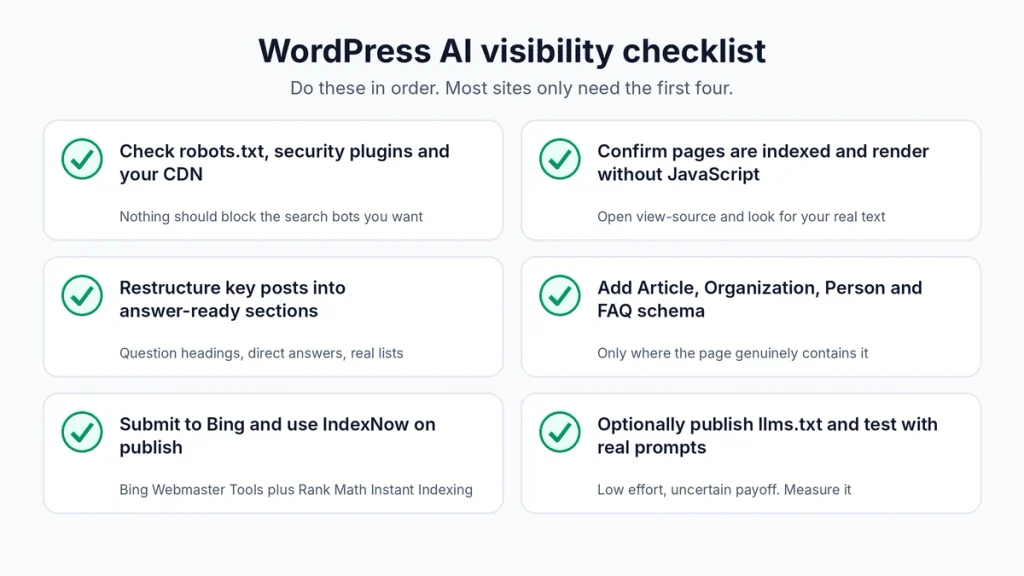
Checklist: make your WordPress site visible to AI search engines
FAQ
Does blocking GPTBot remove my site from ChatGPT search?
No. OpenAI treats GPTBot (training) and OAI-SearchBot (search) as separate controls, so you can block one and allow the other.
Do I need a special plugin to be visible to AI search engines?
No. An SEO plugin such as Rank Math, a correct robots.txt, readable HTML and well-structured content cover the fundamentals. Dedicated AI-visibility plugins can save time, but check what they actually change before you install one.
Is generative engine optimization different from SEO?
Mostly it overlaps. Crawlability, clear writing, trust signals and good structure matter in both. The differences are the extra bots to allow, the focus on quotable answers, and Bing indexing.
How long until AI tools start citing my content?
It varies. Some platforms pick up changes within days and others take weeks, and a cleaner site does not guarantee a citation. Focus on being the clearest answer to a specific question.
Final thoughts
To make your WordPress site visible to AI search engines, you do not need a rebuild or an expensive tool. Check the bots you are blocking, confirm your text is in the HTML, write sections that stand alone, keep schema accurate, and get into Bing. Then measure with real prompts and adjust.
Last reviewed: November 22, 2026. AI crawlers and platform rules change often, so check each provider’s documentation before editing your robots.txt.